
Fine-Tuning VLLMs for Document Understanding
Learn how you can fine-tune language models for specific use cases

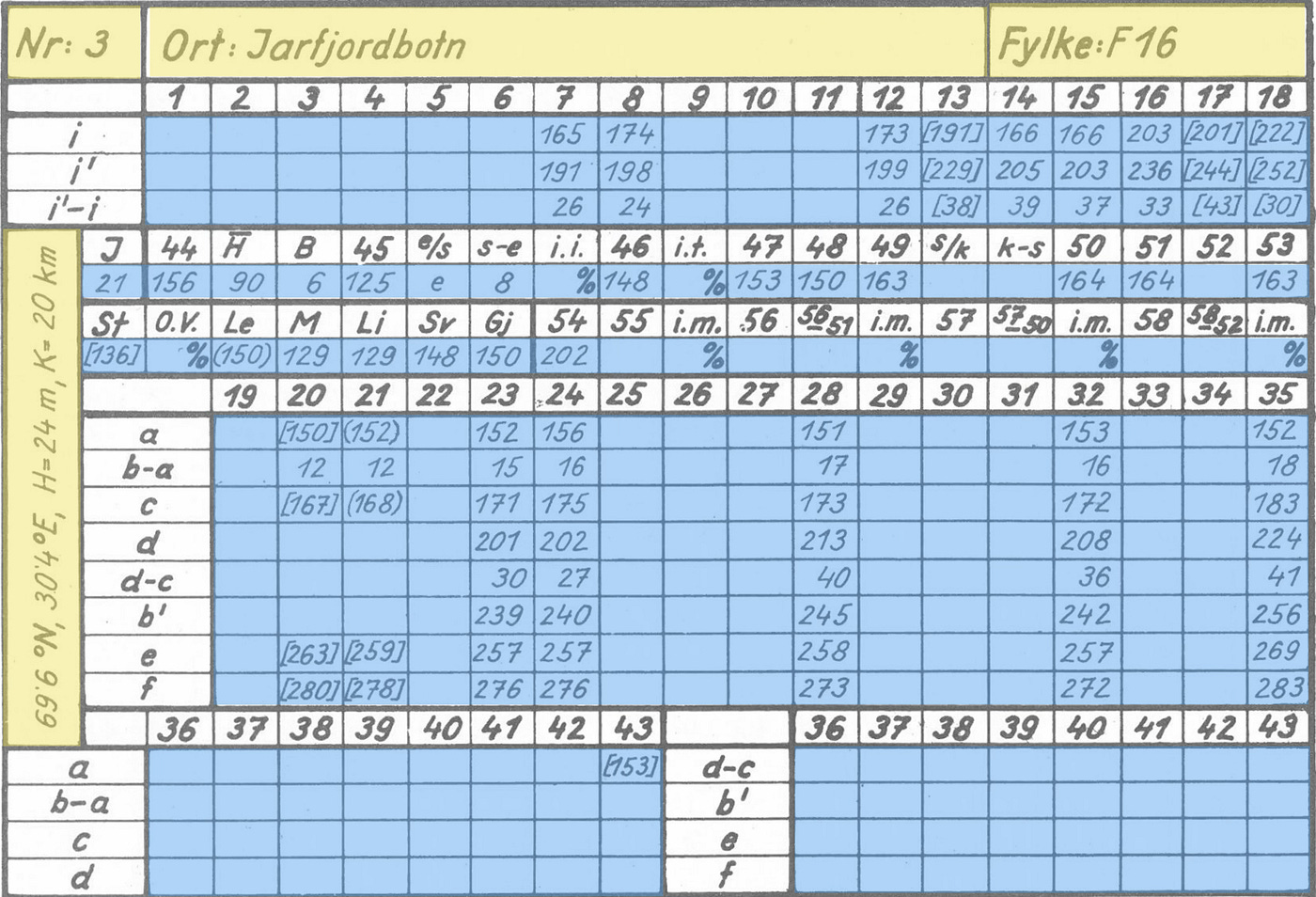
In this article, I discuss how you can fine-tune VLMs (visual large language models, often called VLLMs) like Qwen 2.5 VL 7B. I will introduce you to a dataset of handwritten digits, which the base version of Qwen 2.5 VL struggles with. We will then inspect the dataset, annotate it, and use it to create a fine-tuned Qwen 2.5 VL, specialized in extracting hand-written text.
The main goal of this article is to fine-tune a VLM on a dataset, an important machine-learning technique in today’s world, where language models revolutionize the way data scientists and ML engineers work and achieve. I will be discussing the following topics:
Motivation and Goal: Why use VLMs for text extraction
Advantages of VLMs
The dataset
Annotation and fine-tuning
SFT technical details
Results and plots
Note: This article is written as part of the work done at Findable. We do not profit financially from this work. It is done to highlight the technical capabilities of modern vision-language models and digitize and share a valuable handwritten phenology dataset, which may have a significant impact on climate research. Furthermore, the topic of this article was covered in a presentation during the Data & Draft event by Netlight.
You can view all the code used for this article in our GitHub repository, and all data is available on HuggingFace. If you’re specifically interested in the extracted phenology data from Norway, including geographical coordinates corresponding to the data, the information is directly available in this Excel sheet.
Table of Contents:
Motivation and Goal
Why do we need to use VLMs?
Advantages of VLMs
Training Dataset
Annotation and Fine-Tuning
SFT Technical Details
Results and Plots
Conclusion
1. Motivation and Goal
The goal of this article is to show you how you can fine-tune a VLM such as Qwen for optimized performance on a particular task. The task we are working on here is extracting handwritten text from a series of images. The work in this article is based on a Norwegian phenology dataset, which you can read more about in the README in this GitHub repository. The main point is that the information contained in these images is highly valuable and can, for example, be used to conduct climate research. There is also definitive scientific interest in this topic, for example, this article on analysing long-term changes in when plants flower, or the Eastern Pennsylvania Phenology Project.
Note that the data extracted is presented in good faith, and I do not make any claims as to what the data implies. The main goal of this article is to show you how to extract this data and present you with the extracted data to you for scientific research.
The result model I make in this article can be used to extract the text from all images. This data can then be converted to tables, and you can plot the information as you see in the image below:
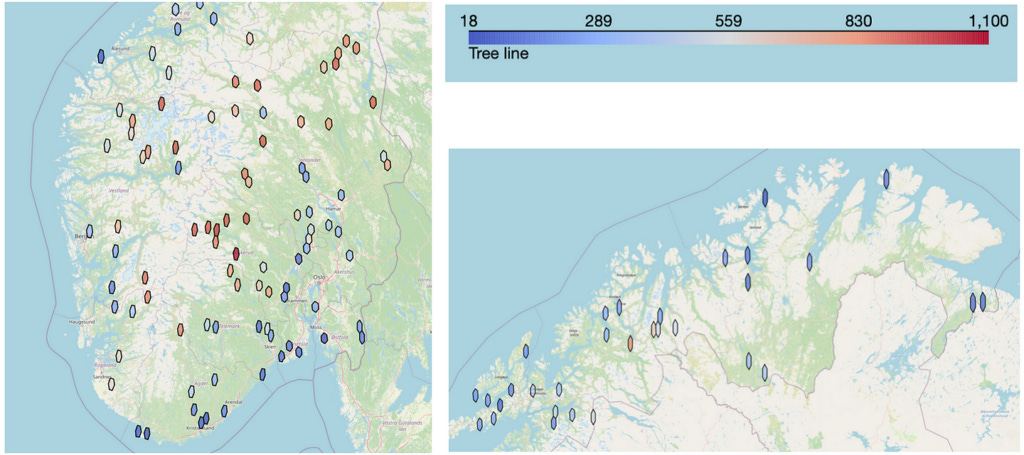
If you are only interested in viewing the data extracted in this study, you can view it in this parquet file.
2. Why do we need to use VLMs?
When looking at the images, you may think we should apply traditional OCR to this problem. OCR is the science of extracting text from images, and in previous years, it has been dominated by engines like Tesseract, DocTR, and EasyOCR.
However, these models are often outperformed by the modern large language models, particularly the ones incorporating vision (typically referred to as VLMs or VLLMs) — the image below highlights why you want to use a VLM instead of traditional OCR engines. The first column shows example images from our dataset, and the two other columns compare EasyOCR vs the fine-tuned Qwen model we will train in this article.
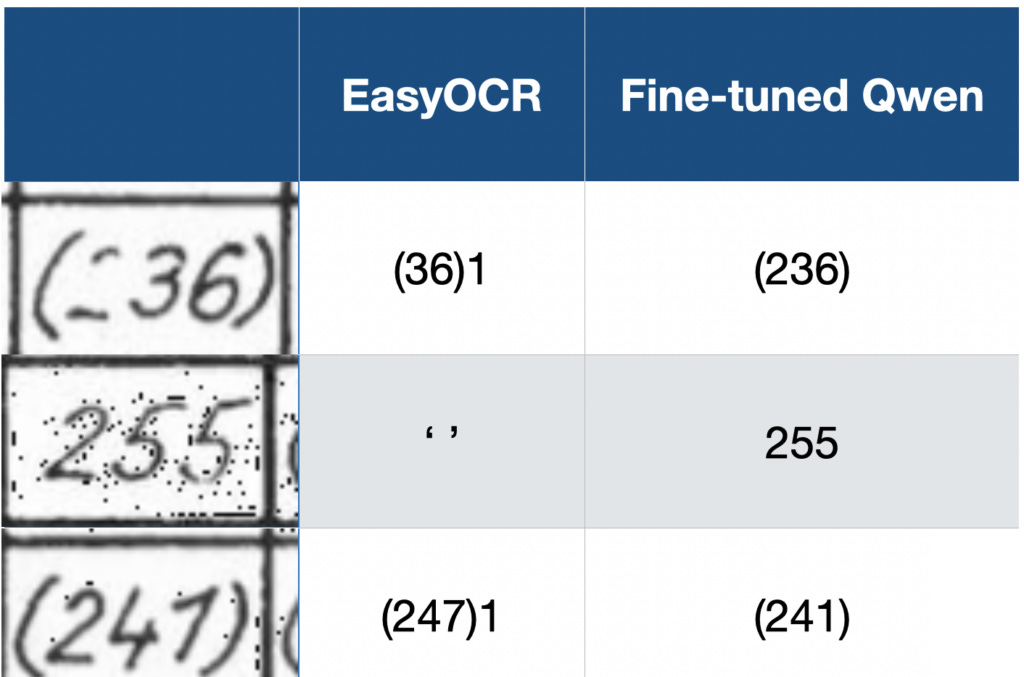
This highlights the main reason to use a VLM over a traditional OCR engine, to extract text from images: VLMs often outperform traditional OCR engines when extracting text from images.
3. Advantages of VLMs
There are several advantages to using VLMs when extracting text from images. In the last section, you saw how the output quality from the VLM exceeds the output quality of a traditional OCR engine. Another advantage is that you can provide instructions to VLMs on how you want it to act, which traditional OCR engines cannot provide.
The two main advantages of VLMs are thus:
VLMs excel at OCR (particularly handwriting)
You can provide instructions
VLMs are good at OCR because it’s part of the training process for these models. This is, for example, mentioned in Qwen 2.5 VL Technical report section 2.2.1 Pre-Training Data, where they list an OCR dataset as part of their pre-training data.
Handwriting
Extracting handwritten text has been notoriously difficult in the past and is still a challenge today. The reason for this is that handwriting is non-standardized.
With non-standardized, I refer to the fact that the characters will look vastly different from person to person. As an example of a standardized character, if you write a character on a computer, it will consistently look very similar across different computers and people writing it. For instance, the computer character “a” looks very similar no matter which computer it is written on. This makes it simpler for an OCR engine to pick up the character, since the characters it extracts from images, most likely, look quite similar to the characters it encountered in its training set.
Handwritten text, however, is the opposite. Handwriting varies widely from person to person, which is why you sometimes struggle with reading other people’s handwriting. OCR engines also have this exact problem. If characters vary widely, there is a lower chance that it has encountered a specific character variation in its training set, thus making extracting the correct character from an image more difficult.
You can, for example, look at the image below. Imagine only looking at the ones in the image (so mask over the 7). Looking at the image now, the “1” looks quite similar to a “7”. You are, of course, able to separate the two characters because you can see them in context, and think critically that if a seven looks like it does (with a horizontal line), the first two characters in the image must be ones.
Traditional OCR engines, however, don’t have this ability. They don’t look at the entire image, think critically about one character’s look, and use that to determine other characters. They must simply guess which character it is when looking at the isolated digit.
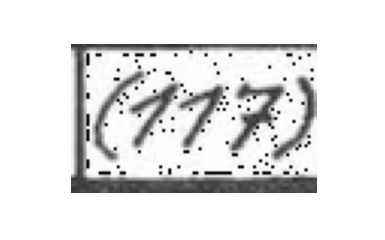
How to separate the digit “1” from “7”, ties nicely into the next section, about providing instructions to the VLMs, when extracting text.
I would also like to add that some OCR engines, such as TrOCR, are made to extract handwritten text. From experience, however, such models are not comparable in performance to state-of-the-art VLMs such as Qwen 2.5 VL.
Providing instructions
Another significant advantage of using VLMs for extracting text is that you can provide instructions to the model. This is naturally impossible with traditional OCR engines since they extract all the text in the image. They can only input an image and not separate text instructions for extracting the text from the image. When we want to extract text using Qwen 2.5 VL, we provide a system prompt, such as the one below.
SYSTEM_PROMPT = """
Below is an instruction that describes a task, write a response that appropriately completes the request.

You are an expert at reading handwritten table entries.  I will give you a snippet of a table and you will
read the text in the snippet and return the text as a string.

The texts can consist of the following:
1) A number only, the number can have from 1 to 3 digits.
2) A number surrounded by ordinary parenthesis.
3) A number surrounded by sqaure brackets.
5) The letter 'e', 's' or 'k'
6) The percent sign '%'
7) No text at all (blank image).

Instructions:

**General Rules**:
    - Return the text as a string.
    - If the snippet contains no text, return: "unknown".
    - In order to separate the digit 1 from the digit 7, know that the digit 7 always will have a horizontal stroke appearing in the middle of the digit.
      If there is no such horizontal stroke, the digit is a 1 even if it might look like a 7.
    - Beware that the text will often be surrounded by a black border, do not confuse this with the text.  In particular
      it is easy to confuse the digit 1 with parts of the border. Borders should be ignored.
    - Ignore anything OUTSIDE the border.
    - Do not use any code formatting, backticks, or markdown in your response. Just output the raw text.
    - Respond **ONLY** with the string. Do not provide explanations or reasoning.
"""
The system prompt sets the outline for how Qwen should extract the text, which gives Qwen a major advantage over traditional OCR engines.
There are mainly two points that give it an advantage:
We can tell Qwen which characters to expect in the image
We can tell Qwen what characters look like (particularly important for handwritten text.
You can see point one addressed in the points 1) -> 7), where we inform it that it can only see 1–3 digits, which digits and letters it can see, and so on. This is a significant advantage, since Qwen is aware that if it detects characters out of this range, it is most likely misinterpreting the image, or a particular challenge. It can better predict which character it thinks is in the image.
The second point is particularly relevant for the problem I mentioned earlier of separating “1” from “7,” which look quite similar. Luckily for us, the author of this dataset was consistent with how he wrote 1s and 7s. The 1s were always written diagonally, and 7s always included the horizontal stroke, which clearly separates the “7” from a “1,” at least from a human perspective of looking at the image.
However, providing such detailed prompts and specifications to the model is only possible once you really understand the dataset you are working on and its challenges. This is why you always have to spend time manually inspecting the data when working on a machine-learning problem such as this. In the next section, I will discuss the dataset we are working on.
4. Training Dataset
I start this section with a quote from Greg Brockman (President of OpenAI as of writing this article), highlighting an important point. In his tweet, he refers to the fact that data annotation and inspection are not prestigious work, but nonetheless, it’s one of the most important tasks you can be spending time on when working on a machine-learning project.
At Findable, I started as a data annotator and proceeded to manage the labeling team at Findable before I now work as a data scientist. The work with annotation highlighted the importance of manually inspecting and understanding the data you are working on, and taught me how to do it effectively. Greg Brockman is referring to the fact that this work is not prestigious, which is often correct, since data inspection and annotation can be monotonous. However, you should always spend considerable time inspecting your dataset when working on a machine-learning problem. This time will provide you with insights that you can, for example, use to provide the detailed system prompt I highlighted in the last section.
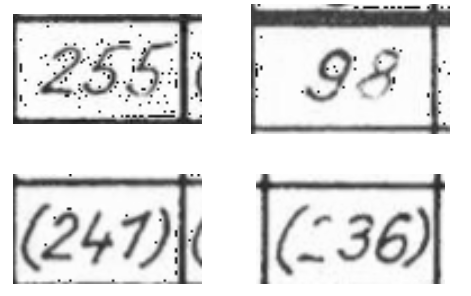
The dataset we are working on consists of around 82000 images, such as the ones you see below. The cells vary in width from 81 to 93 pixels and in height from 48 to 57 pixels, meaning we are working on very small images.
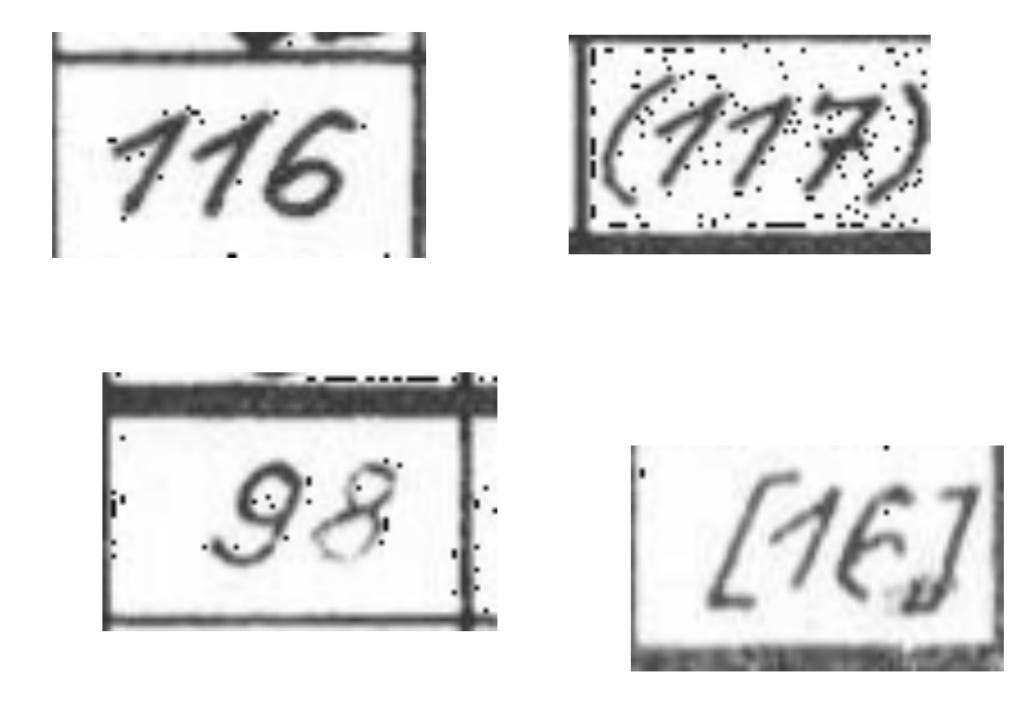
When starting this project, I first spent time looking at the different images to understand the variations in the dataset. I, for example, notice:
The “1”s look similar to the “7”s
There is some faint text in some of the images (for example, the “8” in the bottom left image above, and the “6” in the bottom right image
From a human perspective, all the images are very readable, so we should be able to extract all the text correctly
I then continue by using the base version of Qwen 2.5 VL 7B to predict some of the images and see which areas the model struggles with. I immediately noticed that the model (unsurprisingly) had problems separating “1”s from “7”s.
After this process of first manually inspecting the data, then predicting a bit with the model to see where it struggles, I note down the following data challenges:
“1” and “7” look similar
Dots in the background on some images
Cell borders can be misinterpreted as characters
Parentheses and brackets can sometimes be confused
The text is faint in some images
We have to solve these challenges when fine-tuning the model to extract the text from the images, which I discuss in the next section.
5. Annotation and Fine-Tuning
After properly inspecting your dataset, it’s time to work on annotation and fine-tuning. Annotation is the process of setting labels to each image, and fine-tuning is using these labels to improve the quality of your model.
The main goal when doing the annotation is to create a dataset efficiently. This means quickly producing a lot of labels and ensuring the quality of the labels is high. To achieve this goal of rapidly creating a high-quality dataset, I divided the process into three main steps:

 | A guest post by
|