Efficient Python for Data Scientists Course [11/14]: Make Your Pandas Code 1000 Times Faster With This Trick

Pandas is a popular and widely used library in Python for data manipulation and analysis. While it is powerful and flexible, its performance can sometimes become a bottleneck in large datasets. In this article, we will explore a technique to significantly improve the speed of your Pandas code, increasing its efficiency by up to 1000 times.
Whether you are a beginner or an experienced Pandas user, this article will provide you with valuable insights and practical tips for speeding up your code. So, if you want to boost the performance of your Pandas code, read on!

Table of Contents:
Create Dataset & Problem Statement
Level 1: Loops
Level 2: Apply Function
Level 3: Vectorization
Measuring the Difference
You can find the codes used in this GitHub repository.
Black Friday Discount: Pay $10 for $130 Worth of Value Products

Hi! Black Friday Mega discounts are here till the end of November! For only 10$ you will get:
1. Create Dataset & Problem Statement
First, let’s create the data we will use throughout this article and compare different methods. The data we will collect will include age, time spent in bed, percentage of sleep, favorite food, and least favorite food.
Let’s build a function to get the data given the size:
def get_data(size= 10000):
    df = pd.DataFrame()
    size = 10000
    df[’age’] = np.random.randint(0,100,size)
    df[’time_in_bed’] = np.random.randint(0,9,size)
    df[’pct_sleeping’] = np.random.randint(size)
    df[’favorite_food’] = np.random.choice([’pizza’,’ice-cream’,’burger’,’rice’], size)
    df[’hate_food’] = np.random.choice([’milk’,’vegetables’,’eggs’])
    return df
df = get_data()
df.head()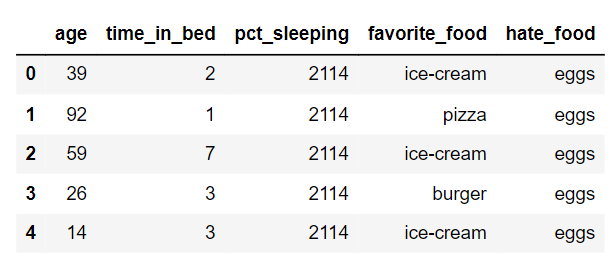
The task we will work on is a reward calculation based on the following measures:
If they were in bed for more than 5 hours and sleeping more than 50%, we will give them their favorite food.
Otherwise, we give them their hate food
If they are over 90 years old, give them their favorite food regardless
This can be represented using the following function:
def reward_cal(row):
    if row[’age’] >=90:
        return row[’favorite_food’]
    if (row[’time_in_bed’] > 5) & (row[’pct_sleeping’]>0.5):
        return row[’favorite_food’]
    return row[’hate_food’]
2. Level 1: Loops
The first and straightforward approach is to use for loops to iterate over each row of the data frame. The code below
%%timeit

for index, row in df.iterrows():
   df.loc[index,’reward’] = reward_cal(row)
As we can see, the computation time used to iterate through every row of the data frame is 15.8 s. Given that the data has only 10000 rows, which is considered small. So if the data has millions of rows so it will take hours to do only one task. Therefore, this is not the most efficient way to iterate through a data frame. So let’s discuss the second method, which will improve the time complexity.
3. Level 2: Apply Function
The .apply() method in pandas is used to apply a function to each element in a pandas dataframe. It can be used to apply a custom function to each element in a specific column or to apply a function along either axis (row-wise or column-wise) of the dataframe. Let’s use it to apply the reward calculation function to each row of the data frame and then calculate the computational time:
%%timeit
df[’reward’] = df.apply(reward_cal, axis = 1)
The average time to apply the function to the 10000 rows of the data frame is only 535 ms, which is 0.535 seconds. This is around 15 times faster than using the loops. However, we are still not done. We can still improve the speed and make it 1000 times faster. Let’s see how!
4. Level3: Vectorization
Vectorization in pandas refers to the process of applying operations to entire arrays or sequences of data, as opposed to applying them to individual elements one by one. This is done for performance reasons, as vectorized operations are usually much faster than non-vectorized operations, especially in large datasets.
Let’s apply this to the data using the conditions stated above:
%%timeit

df[’reward’] = df[’hate_food’]
df.loc[((df[’pct_sleeping’]>0.5) &(df[’time_in_bed’]>5))| (df[’age’]>90), ‘reward’] = df[’favorite_food’]
We can see now a tremendous decrease in the computation time compared to the previous two methods. The computation time has at least decreased by 1000. Let’s have a look at the differences in a bar plot.
5. Measuring the Difference
Finally, to have a better intuition of the difference between these three methods. We will plot a bar plot diagram using the code below:
results = pd.DataFrame(
    [
        [”Loop”, 15800],
        [”apply”, 535],
        [’vectorized’, 5.8]

    ],
    columns = [’method’, ‘run_time’]

)

results.set_index(’method’)[’run_time’].plot(kind=’bar’)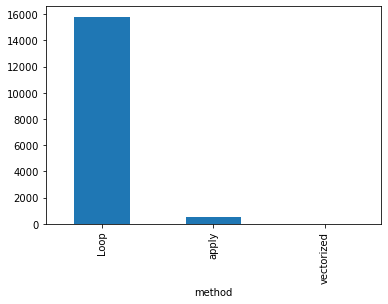
Looking at the bar plot, we can get a better intuition of the huge difference between the different computational times of the different methods used in this article.
If you like the article and would like to support me, make sure to:
👏 Clap for the story (50 claps) to help this article be featured
Follow me on Medium
📰 View more content on my Medium profile
Everything I’ve Written, One Button Away, With 40% Off
Announcing My Ebooks Bundle + 50% Discount to my Followersyousefhosni.medium.com
Looking to start a career in data science and AI, but do not know how. I offer data science mentoring sessions and long-term career mentoring:
Long-term mentoring: https://lnkd.in/dtdUYBrM
Mentoring sessions: https://lnkd.in/dXeg3KPW